
TL;DR:
- Online reviews significantly increase customer bookings and trust by acting as a measurable marketing channel.
- Implementing a systematic review request, response, and display process boosts local visibility and sales for restaurants.
Online customer reviews are a high-ROI marketing asset you can systematically collect, manage, and repurpose to increase bookings, conversions, and customer trust. The Spiegel Research Center found that displaying reviews can increase purchase likelihood by 270% once a product or service has at least five reviews versus none. That’s not a marginal gain. For a full-service restaurant, that kind of lift on a reservation page or private-event inquiry form is the difference between a slow Tuesday and a packed house.
Here’s the one-page playbook to hand your manager today:
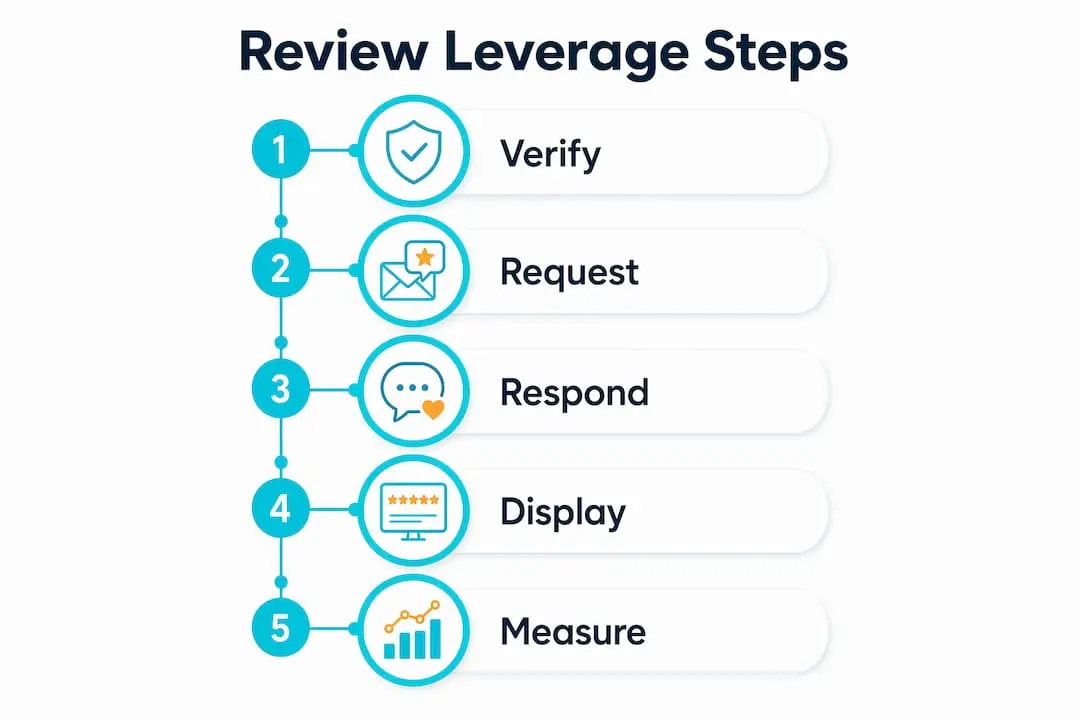
Your 5-step reviews playbook:
- ✅ Ask at the right moment — post-visit, post-delivery, or right after a standout service touchpoint
- ✅ Automate the request link — connect your Google Business Profile review link to your email receipt or SMS follow-up
- ✅ Respond publicly to every review — positive, neutral, and negative, signed with a real name
- ✅ Embed reviews on high-value pages — reservation pages, private-event landing pages, and your homepage
- ✅ Measure what matters — track volume, recency, sentiment, and conversion lift monthly
Ionhospitality works with full-service restaurants to build and execute exactly this kind of program, from content creation to review-driven ad creative. The sections below break down each step in detail.
Table of Contents
- Why online reviews drive customers, conversions, and revenue
- How do reviews influence your SEO and Local Pack visibility?
- Tactical ways to get more reviews, consistently
- How should you respond to positive and negative reviews?
- Where should you display and repurpose your best reviews?
- What’s the best workflow for monitoring and managing reviews?
- How do you measure the ROI of your reviews program?
- How do you handle fake, fraudulent, or problematic reviews?
- What does the research actually say about reviews and sales?
- Key Takeaways
- The agency perspective: where restaurants should focus first
- Ionhospitality turns your reviews into a full booking engine
- Useful sources and further reading
Why online reviews drive customers, conversions, and revenue
Most restaurant owners know reviews matter. Few treat them as a measurable marketing channel with trackable ROI. That gap is where your competitors are winning.
Stat to know: Purchase likelihood increases 270% when a service has at least five reviews compared to none. Verified-buyer badges push that advantage up by another 15%.
The conversion math is straightforward. A diner comparing two Italian restaurants on Google Maps will almost always click the one with more recent, detailed reviews, even if the other has a slightly higher average rating. Positive reviews increase click-through from local pack results, while a prominent negative review sitting unanswered at the top of your profile can actively reduce traffic.
Trust is the other lever. Reviews are how consumers verify that your restaurant delivers what your website promises. They function as social proof for restaurants in the same way a packed dining room signals quality to someone walking past on the street. When a first-time guest is deciding between booking your private dining room for a corporate dinner versus a competitor’s, a wall of detailed, recent five-star reviews from similar events closes that sale before you ever pick up the phone.
Reviews also feed your digital reputation in ways that compound over time. The BrightLocal Local Consumer Review Survey confirms that recency, positive sentiment, high star ratings, and owner responses are the top factors consumers use when choosing a local business. Miss any one of those, and you’re leaving bookings on the table.
How do reviews influence your SEO and Local Pack visibility?
Reviews are one of the few things that simultaneously improve your search ranking and your conversion rate. Most SEO tactics do one or the other. Reviews do both.

Volume vs. recency: A single burst of 50 reviews in one week looks suspicious to Google’s algorithm and may be flagged. A steady trickle of new reviews every month signals organic, ongoing customer engagement. Recency matters because consumers expect to see feedback from the last 30–90 days. An impressive total review count with nothing recent reads as stale.
Keyword-rich language: When a guest writes “best wood-fired pizza in Brooklyn” or “perfect venue for a rehearsal dinner,” they’re doing your SEO work for you. Customer reviews naturally contain long-tail keywords that match exactly what future customers are searching. You can’t buy that kind of contextual relevance.
Structured data and review snippets: Adding schema markup to your website’s review displays tells search engines to surface those stars in organic results. Google Seller Ratings and review-derived ad extensions can increase ad click-through rates and reduce cost-per-click, making your paid campaigns more efficient at the same time.
Quick SEO actions to take this week:
- Claim and verify your Google Business Profile if you haven’t already
- Add schema markup to any page that displays customer reviews
- Monitor your reviews for repeated phrases and add those terms to your on-page copy
- Respond to every review to signal active engagement to Google’s local ranking algorithm
Pro Tip: When asking guests to leave a review after a private event or catering job, encourage them to mention specific details: what they ordered, how the service felt, and the occasion. That specificity generates keyword-rich content that helps you rank for searches like “corporate dinner catering [city]” or “rehearsal dinner venue [neighborhood].”
Tactical ways to get more reviews, consistently
The biggest mistake restaurants make is treating review collection as passive. You don’t wait for guests to find your review link on their own. You build a system that puts the ask in front of them at the exact right moment.
Research note: Up to 80% of reviews originate from follow-up emails urging customers to review their experience. The ask itself is the engine.
When to ask
Timing is everything. The best moments:
- Right after a great experience — a server who just delivered a flawless birthday dinner can say, “We’d love to hear your feedback on Google. I’ll text you the link.”
- Post-visit email or SMS — send within 24 hours while the experience is fresh
- After a private event or catering job — follow up within 48 hours; satisfaction is highest right after a successful event
Channels and mechanics
Google Business Profile verification is your starting point. Once verified, you generate a direct review link you can embed in emails, print on receipts, and turn into a QR code for table tents or check presenters. SMS requests via tools like TextRequest get high open rates and put the link one tap away. Yelp and Trustpilot have their own request flows, but note that Yelp’s policies prohibit directly soliciting reviews, so your Yelp strategy should focus on making it easy for guests to find your profile rather than a direct ask.
Ask scripts and templates
Staff verbal ask (table close):
Post-visit email (send within 24 hours):
Follow-up reminder (send 3 days later if no review):
Pro Tip: Never offer discounts, free items, or any compensation in exchange for a positive review. That violates Google’s policies, Yelp’s terms, and FTC endorsement guidelines. You can ask for an honest review; you cannot pay for a good one.
How should you respond to positive and negative reviews?
Every response you write is marketing. The guest who left the review will read it, but so will the next 50 people who find your restaurant on Google. Write for both audiences.
Treat review management as a marketing function: responses should be signed with a real name and title to humanize the brand, per Sprout Social’s guidance on review management. “Thanks, Sarah, Front of House Manager” lands differently than an anonymous corporate reply.
Response decision flow
- Positive review → Thank them, mention something specific from their review, invite them back
- Neutral (3-star) review → Acknowledge the positives, address the gap, offer a direct contact for follow-up
- Negative review → Apologize for the experience, take responsibility without being defensive, move the conversation offline
- Fake or defamatory review → Calm public reply, flag for platform removal, document everything
Copy-ready templates
Positive review:
Negative review:
Neutral review:
Timing and tone
Aim to respond within 24 hours. Negative reviews that sit unanswered for days signal to future guests that you don’t care. Keep the tone warm but professional. Never argue, never get defensive, and never post a response you wouldn’t want on a billboard outside your restaurant.
Pro Tip: Create a shared Google Doc or Notion page with 10–15 pre-approved response templates. Train your front-of-house manager to personalize and post responses daily. This keeps your voice consistent and cuts response time to under five minutes per review.
Where should you display and repurpose your best reviews?
Collecting reviews is step one. Putting them to work is where the real return comes in.
High-impact placements on your website:
- Homepage trust module — a rotating carousel of your top five reviews signals credibility to every new visitor
- Private-event landing page — a testimonial from a recent corporate dinner or wedding rehearsal converts event inquiries faster than any sales copy
- Reservation and online-ordering pages — reviews displayed at the point of decision reduce hesitation and increase completions
- Menu pages — a quote calling out a specific dish (“the short rib is unreal”) next to that item on the menu is a conversion nudge
Your restaurant website should make these placements easy to update. Static screenshots go stale; use an embed tool that pulls live reviews so recency stays visible.
Repurposing formats that work:
Reviews become content. Pull a five-star quote and turn it into a quote card for Instagram Stories. Film a short video of a happy guest (with their permission) and post it as a Reel. Use review snippets as ad creative. Consumers increasingly use video reviews on platforms like Instagram and YouTube, so supporting guests who post video content about your restaurant is a smart amplification play.

Integrating reviews into your service pages also adds fresh, user-generated content that search engines reward with higher rankings and longer dwell times.
Permissions workflow: Before you repurpose a guest’s review in paid ads or branded content, get written permission. A simple DM or email asking, “We’d love to feature your review in our marketing. Is that okay?” is enough. Log the response. This keeps you compliant with FTC guidelines and platform terms.
Pro Tip: Check out the restaurant content strategies that pair review quotes with behind-the-scenes video for maximum engagement. Review-backed content consistently outperforms generic promotional posts.
What’s the best workflow for monitoring and managing reviews?
You need a system, not a habit. A habit breaks when your manager gets busy. A system runs regardless.
Essential features to look for in a review management tool:
| Feature | Why it matters |
|---|---|
| Multi-channel aggregation | Pulls Google, Yelp, Trustpilot, and others into one dashboard |
| Real-time alerts | Notifies your team within minutes of a new review |
| Response templates | Speeds up replies and keeps tone consistent |
| Tagging and assignment | Routes reviews to the right team member (FOH, catering, GM) |
| CRM integration | Connects review data to guest profiles for follow-up |
| Sentiment analysis | Flags recurring issues before they become patterns |
| Reporting dashboard | Tracks volume, rating trends, and response rate over time |
The six-step workflow:
- Collect — automated post-visit requests via email and SMS
- Monitor — daily alert check; assign new reviews within 2 hours
- Assign — route to the relevant team member based on review topic (food, service, events)
- Respond — reply within 24 hours using approved templates, personalized
- Resolve — for negative reviews, follow up privately and confirm resolution
- Measure — weekly volume and rating check; monthly sentiment and conversion report
Keep automation in its lane. Use it to send requests and aggregate reviews. The actual responses should always come from a real person. Automated replies are easy to spot and they undercut the trust you’re trying to build.
How do you measure the ROI of your reviews program?
If you can’t measure it, you can’t improve it. Here are the KPIs that actually tell you whether your reviews program is working:
Primary KPIs to track monthly:
- Review volume — new reviews per month, by platform
- ⭐ Average star rating — track trend, not just snapshot
- Review recency — percentage of reviews from the last 30 and 90 days
- Response rate — percentage of reviews that received a reply
- ⏱️ Response time — average hours to first reply
- Sentiment score — ratio of positive to negative mentions by topic
- Conversion lift — reservation or inquiry completions on pages that display reviews vs. those that don’t
Measuring conversion lift: Set up a simple before/after test on your reservation page. Add a review module, then compare booking completions over the following 30 days against the prior period. For review-driven campaigns, use UTM-tagged links in your email and SMS requests so you can track which channel drives the most review activity and downstream bookings.
Reporting cadence:
- Weekly operational dashboard — volume, new reviews, response rate, any unresolved negatives (for your FOH manager)
- Monthly performance report — rating trends, sentiment analysis, conversion lift, and platform-by-platform breakdown (for the owner or GM)
Building your restaurant’s online presence around measurable review activity turns a passive reputation into an active growth lever.
How do you handle fake, fraudulent, or problematic reviews?
Fake reviews happen. Knowing how to respond quickly and correctly protects your reputation without making the situation worse.
Signs a review may be fake:
- Reviewer has no profile history or was created the same day as the review
- The review contradicts verifiable facts (a date you were closed, a dish you don’t serve)
- Multiple reviews with similar phrasing appear in a short window
- The reviewer has left identical reviews for multiple competing businesses
Platform dispute process:
- Document everything first: screenshot the review, note the date, pull any relevant order records or reservation logs
- Flag the review through the platform’s reporting tool (Google, Yelp, and Trustpilot all have dispute submission flows)
- Post a calm, factual public reply: “We’ve looked into this and have no record of a visit matching this description. We’ve flagged this review for platform review and are happy to connect directly at [contact].”
- Follow up with the platform if the review isn’t removed within 7–10 days
Google and major review platforms can remove or penalize fake and incentivized reviews, but the process takes time. Your public reply is what future guests will see in the meantime, so make it measured and professional.
Legal and ethical guardrails: Never post a retaliatory or defamatory reply. If a review contains threats, personal attacks, or clearly false statements of fact that damage your business, document it and consult an attorney before responding. For most negative reviews, even harsh ones, the right move is a professional public reply followed by a private resolution attempt.
Pro Tip: The FTC’s guidance on evaluating online reviews is worth bookmarking. It explains how fake reviews are identified and what enforcement looks like, which helps you understand what platform reviewers are looking for when you submit a dispute.
What does the research actually say about reviews and sales?
The data behind review strategy is more nuanced than “more stars = more sales.” Here’s what the research reveals that most guides skip.
The Spiegel Research Center’s analysis of multiple e-commerce sites found that purchase likelihood increases 270% once a product or service reaches five reviews compared to zero. Nearly all of that lift happens within the first ten reviews. After that, the marginal value of each additional review drops sharply. This means your first priority is getting every high-value page to at least five reviews, not chasing a total count of hundreds.
The sweet spot: Purchase likelihood peaks when the average star rating sits between 4.2 and 4.5. A perfect 5.0 often looks suspicious to sophisticated buyers. A profile with a few honest 3-star reviews alongside dozens of 5-star ones reads as more credible than a flawless score.
Verified-buyer badges add another layer. Reviews from verified buyers carry a 15% purchase-odds advantage over anonymous reviews, because readers trust that the reviewer actually experienced the service. For restaurants, this means post-visit email requests (which produce verified reviews) are more valuable than organic reviews left without prompting.
Sprout Social’s review management guidance reinforces that consistent monitoring, responding, and integrating reviews into broader marketing leads to stronger reputation and higher conversion rates. Signing responses with a real name and title is a small detail with a measurable trust impact.
Negative reviews, handled well, actually build credibility. A profile with zero negative reviews reads as curated or fake to a savvy diner. The goal isn’t a perfect score. It’s a profile that looks real, recent, and actively managed.
Key Takeaways
A reviews program that collects, responds to, displays, and measures customer feedback is one of the highest-ROI marketing investments a restaurant can make.
| Point | Details |
|---|---|
| Five reviews is the threshold | Purchase likelihood increases 270% at five reviews vs. none; prioritize getting every key page there first. |
| Recency beats volume | A steady monthly flow of new reviews outperforms a one-time burst for Local Pack signals and consumer trust. |
| Every response is marketing | Sign replies with a real name and title; future guests read your responses as much as the original review. |
| Embed reviews at decision points | Place review modules on reservation, private-event, and online-ordering pages to reduce hesitation and lift completions. |
| Ionhospitality executes the full program | From review-driven ad creative to website embeds and social repurposing, Ionhospitality builds and runs this for restaurants. |
The agency perspective: where restaurants should focus first
Most restaurants I work with have the same problem: they know reviews matter, but they’re spread too thin to build a real system. A server forgets to ask. The GM responds to reviews once a week, if that. The review link lives in a Google Doc nobody opens. Sound familiar?
Here’s how to cut through it. For a full-service restaurant, Google Business Profile is your first and most important platform. It drives Local Pack visibility, feeds Google Maps, and produces the verified reviews that carry the most weight in search. Get that claimed, verified, and linked to your email and SMS follow-up before you touch anything else.
Yelp matters more for some markets than others. In major cities like New York, Chicago, and San Francisco, Yelp still drives significant reservation traffic. In smaller markets, its influence is lower. Check your own traffic sources before investing heavily in Yelp-specific tactics. Trustpilot is worth adding once your Google and Yelp programs are running, particularly if you do significant catering or corporate event business where B2B buyers want a third-party trust signal.
Operational shortcuts that actually stick:
- Train hosts and servers to make the ask at table close, not at the door. The moment a guest says “that was amazing” is the moment to hand them the QR code.
- Put QR codes on check presenters, not just table tents. The guest is already holding it.
- For private events and catering, build the review request into your post-event follow-up email sequence. Ask for specific details about the event, the food, and the service. That specificity generates keyword-rich content that helps you rank for catering and event searches.
When Ionhospitality phases a reviews program for a new restaurant client, we start with the infrastructure: verify the Google Business Profile, set up the review request automation, and build the response template library. Month two is about embedding reviews on the website and launching the first round of review-driven social content. By month three, we’re measuring conversion lift and expanding to secondary platforms. It’s a sprint, not a marathon, and the results show up fast.
Ionhospitality turns your reviews into a full booking engine
You’ve built the reviews. Now put them to work. Ionhospitality helps full-service restaurants take that stack of five-star feedback and turn it into scroll-stopping social content, high-converting ad creative, and website embeds that push guests from “maybe” to “booked.”
We handle the content creation, the geo-targeted ad campaigns, the social management, and the website integrations, all done for you with zero commissions. If your reservation page isn’t displaying reviews, your Instagram isn’t amplifying guest love, and your private-event inquiries aren’t backed by social proof, you’re leaving real revenue on the table. Our social media engagement campaigns are built specifically to turn review content into bookings, not just likes.
Ready to see what a review-powered marketing program looks like for your restaurant? Book a discovery call and we’ll walk through exactly where your biggest opportunities are.
Useful sources and further reading
The research and platform guidance behind this playbook:
-
How Online Reviews Influence Sales — Spiegel Research Center / Medill — The foundational study on conversion lift, verified-buyer badges, and the 4.2–4.5 star sweet spot. Required reading for anyone building a review strategy.
-
Online Review Management — Sprout Social — Practical guidance on treating review management as a marketing function, including response best practices and tool recommendations.
-
Local Consumer Review Survey — BrightLocal — Annual survey tracking how consumers use reviews to choose local businesses; covers recency expectations, owner response impact, and video review trends.
-
Google Reviews: How to Get More for Your Business — Shopify — Step-by-step guide to verifying your Google Business Profile, generating a review link, and staying compliant with Google’s policies.
-
How to Leverage Customer Reviews for Better SEO Rankings — Fast Company — Covers the SEO mechanics of reviews: long-tail keywords, dwell time, structured data, and Local Pack signals.
-
How to Evaluate Online Reviews — FTC Consumer Advice — The FTC’s guidance on fake reviews, disclosure requirements, and enforcement. Bookmark this for compliance reference.
-
Free Restaurant Audit — KitchenRush — A free audit tool that shows how your restaurant ranks on Google and where your local visibility gaps are. Useful complement to a reviews program.

Add a Comment