

An event inquiry form is a lead-capture tool venues and organizers use to collect the basics — event type, date, headcount, and budget — before a booking conversation starts. Think of it as your first handshake with a potential client. Get a ready-made template right now from any of these platforms:
- 🟢 Google Forms — free, fast, shareable link in minutes
- 🔵 JotForm — polished templates with payment and CRM options
- 🟠 123FormBuilder — gallery of ready-made event inquiry templates to copy
- 🟣 Typeform — conversational format, strong for higher-end venues
- ⚪ Microsoft Forms — best when your team already runs on Microsoft 365
After a submission, expect an initial auto-reply immediately and a full response within 1–7 business days depending on the venue’s size and volume.
Key Takeaways
A well-built event inquiry form captures the right details upfront, sets clear expectations, and gives your team everything needed to convert a lead into a signed booking.
| Point | Details |
|---|---|
| Start with a template | Use JotForm, 123FormBuilder, or Google Forms to clone a ready-made template instead of building from scratch. |
| Include date flexibility | A secondary date field and flexibility toggle lets you propose alternatives and recover leads when the first choice is unavailable. |
| Add conditional logic | Show AV, catering, and layout fields only when relevant to reduce form abandonment and improve data quality. |
| Auto-respond immediately | State your response window (1–7 business days) and deposit policy in the auto-reply to screen leads and set expectations. |
| Ionhospitality for restaurants | Ionhospitality builds and markets the full private-event funnel — inquiry form, website integration, and social campaigns — with zero commissions. |
Table of Contents
- Which template type matches your event?
- Essential fields every event inquiry form should collect
- How to build your event inquiry form from scratch
- Which form builder works best for event inquiries?
- Copy-ready sample templates you can use right now
- Design tips that increase private-event bookings for restaurants 🍽️
- What happens after someone submits an inquiry?
- How Ionhospitality helps restaurants sell more private events
- Why your inquiry form is your most underrated sales tool
- Sources
Which template type matches your event?
Not every event needs the same form. A wedding inquiry asks very different questions than a vendor booth request. Here are the six most common template types and what each one should capture:
- 🎊 Wedding — preferred dates, ceremony vs. reception space, guest count, catering preferences, and whether a rehearsal dinner space is needed. JotForm and 123FormBuilder both carry wedding-specific templates.
- 💼 Corporate meeting or retreat — company name, number of attendees, AV requirements, breakout room needs, and preferred catering style (breakfast, lunch, full-day). Google Forms handles this well for teams on a budget.
- 🍽️ Private dining / restaurant buyout — party size, preferred dining style (seated vs. standing), menu preferences, budget per head, and deposit acknowledgment. This is where a restaurant event inquiry form earns its keep.
- 🎂 Birthday or social party — occasion type, theme, date flexibility, headcount, and any entertainment or décor requests.
- 🏪 Vendor booth / exhibition — company name, product category, booth size needed, power requirements, and setup/teardown windows. 123FormBuilder has vendor-specific templates.
- 📦 Catering request — event date, delivery or on-site service, headcount, dietary restrictions, and catering package preferences.
Pro Tip: JotForm’s template gallery lets you filter by event type and clone a form in one click — no blank-page anxiety.
Essential fields every event inquiry form should collect
A well-structured field set covers six categories. Here’s the blueprint:
📋 Contact data (all required)
- Full name
- Email address
- Phone number and best time to call
- Organization or company name (optional for social events)
📅 Event basics (required)
- Event type (dropdown: wedding, corporate, birthday, etc.)
- Preferred date AND a secondary date (date flexibility toggle — this alone increases conversion because it lets you propose alternatives)
- Event start and end time
🏛️ Logistics (required)
- Expected headcount
- Indoor vs. outdoor preference
- AV or tech needs (microphone, projector, screen)
- Setup/teardown time needed
💰 Commercial (required)
- Estimated budget range (dropdown or range slider)
- Deposit policy acknowledgment checkbox
- Payment method preference (optional)
🥗 Special requirements (optional)
- Dietary restrictions or allergen notes
- Accessibility needs
- Specific décor or theme requests
📝 Policy acknowledgment (required)
- Terms and conditions checkbox
- How did you hear about us? (optional but valuable for attribution)
Pro Tip: Conditional logic keeps your form clean. Show AV fields only when the submitter selects “corporate” or “conference.” Show catering fields only when they check “yes” to on-site food. Fewer irrelevant questions means more completions and better data for your team.
How to build your event inquiry form from scratch
Follow these steps and you’ll have a live, tested form in under an hour.
- Choose your template. Pick a platform (JotForm, 123FormBuilder, Google Forms, Typeform, or Microsoft Forms) and select the closest event-type template. Don’t start from a blank form — it doubles your build time.
- Customize fields and add conditional logic. Rename labels to match your venue’s language. Add your logo and brand colors. Set conditional rules so irrelevant fields stay hidden.
- Set up notifications and an auto-responder. Configure an instant email to your inbox when a form lands. Write an auto-reply that confirms receipt, states your response window, and lists any policies (minimum headcount, deposit requirements). Institutional venues use this to route inquiries to the right internal team automatically.
- Connect your calendar, CRM, or payment tool. JotForm and 123FormBuilder integrate with Google Calendar, HubSpot, Salesforce, and Stripe. Google Forms connects to Google Sheets for lightweight tracking.
- Test before you publish. Submit a test entry yourself. Check the auto-reply, verify the notification lands in the right inbox, and walk through every conditional path.
- Publish and embed. Copy the shareable link or embed the form on your website’s private events page.
Pre-launch checklist:
- ✅ Mobile layout looks clean on a phone screen
- ✅ All required fields are marked clearly
- ✅ Conditional paths trigger correctly
- ✅ Auto-responder fires with the right content
- ✅ Submissions route to your CRM or spreadsheet
- ✅ Privacy policy link is visible on the form
Which form builder works best for event inquiries?
Here’s a quick comparison across the dimensions that matter most for event inquiry use cases:
| Platform | Ease of Use | Templates | Conditional Logic | Payments/Deposits | Integrations | Pricing |
|---|---|---|---|---|---|---|
| Google Forms | ⭐⭐⭐⭐⭐ | Basic | Limited | None | Google Sheets | Free |
| Microsoft Forms | ⭐⭐⭐⭐⭐ | Basic | Limited | None | Microsoft 365 | Free with M365 |
| 123FormBuilder | ⭐⭐⭐⭐ | Strong gallery | Yes | Yes | CRM, email, calendar | Free tier + paid |
| JotForm | ⭐⭐⭐⭐ | Extensive | Yes | Yes (Stripe, PayPal) | many integrations | Free tier + paid |
| Typeform | ⭐⭐⭐⭐ | Moderate | Yes | Yes | HubSpot, Salesforce | Free tier + paid |
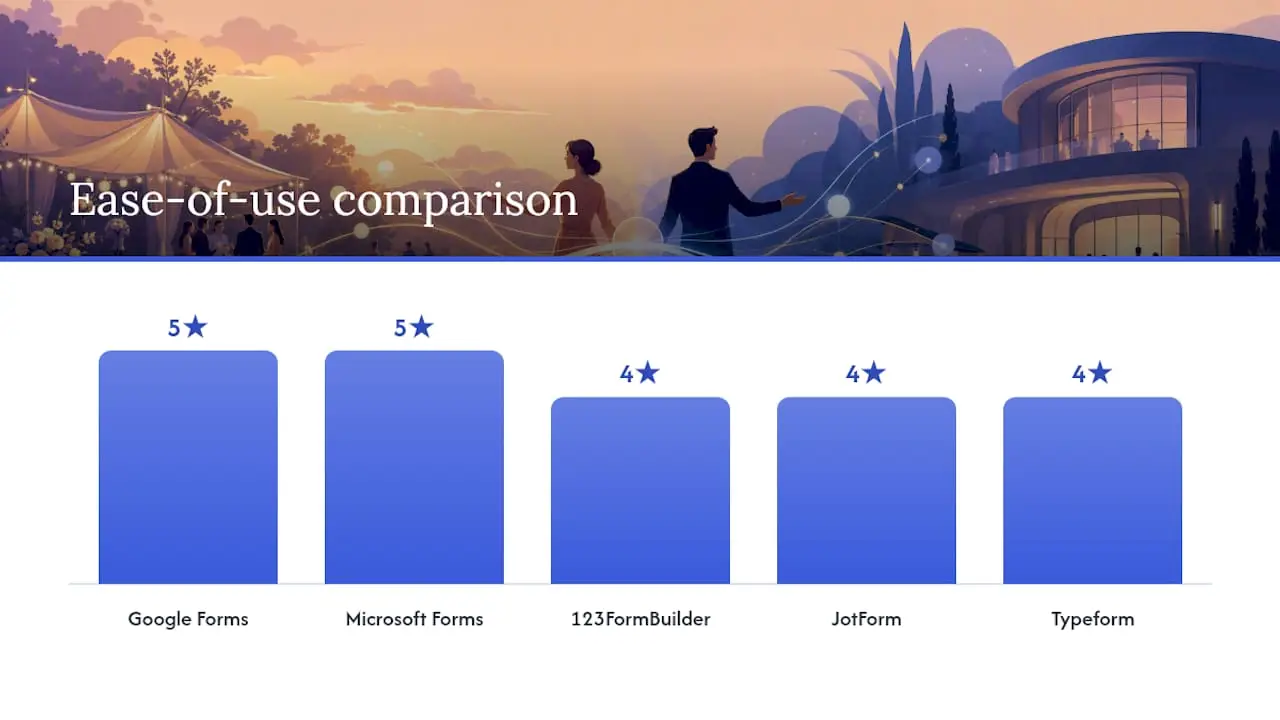
When a free tool is enough: Google Forms or Microsoft Forms work well for small venues, internal event teams, or anyone who just needs a shareable link fast. If your team already lives in Google Workspace or Microsoft 365, stick with what you know.
When to upgrade to a paid builder: Go with JotForm, Typeform, or 123FormBuilder when you need deposit collection, branded forms, CRM sync, or multi-step conditional flows. For restaurants running regular private events, the payment and automation features pay for themselves quickly.
Copy-ready sample templates you can use right now
🟢 Short quick-inquiry form (lead capture)
Use this on a landing page or social media link-in-bio. Goal: capture the lead fast.
- Your name (required)
- Email address (required)
- Phone number (required)
- Type of event — dropdown: Wedding / Corporate / Birthday / Other (required)
- Preferred event date (required)
- Approximate guest count (required)
- Anything else we should know? — short text (optional)
Adapt for restaurants: Add “Preferred dining time” and “Budget per person” to qualify the lead before your first call.
🔵 Standard inquiry form (most venues)
- Full name (required)
- Email address (required)
- Phone number and best time to reach you (required)
- Organization or company name (optional)
- Event type — dropdown (required)
- Preferred date (required)
- Alternative date (optional — strongly recommended)
- Event start time / end time (required)
- Expected number of guests (required)
- Indoor or outdoor preference (required)
- AV or tech needs? — Yes/No → conditional: list specific needs (optional)
- Catering required? — Yes/No → conditional: dietary notes (optional)
- Estimated budget range — dropdown (required)
- How did you hear about us? (optional)
- I agree to the venue’s terms and deposit policy — checkbox (required)
🟣 Detailed venue request (corporate or large events)
All fields from the standard form, plus:
- Floorplan or room layout preference — dropdown: Theater / Banquet / Cocktail / Custom (required)
- Staging or podium needed? — Yes/No (optional)
- Certificate of insurance on file? — Yes/No (optional)
- Preferred setup/teardown window (required)
- Accessibility requirements (optional)
- Vendor or external caterer bringing in? — Yes/No (optional)
Adapt for vendor/exhibit requests: Replace “guest count” with “booth size needed” and add “power outlet requirements” and “product category.”
Design tips that increase private-event bookings for restaurants 🍽️
A generic form loses bookings. A restaurant-specific form closes them. Here’s what to add and why it works:
Pro Tip: Always include a date-flexibility toggle (“Are you flexible on dates? Yes / No / Somewhat”). When a client’s first-choice date is gone, you can immediately propose alternatives instead of losing the lead entirely.
Conversion-focused fields for restaurant inquiry forms:
- 🎉 Party type — Birthday / Anniversary / Corporate dinner / Holiday party / Other
- 💵 Budget per person — dropdown with realistic ranges for your menu tier
- 🪑 Seated vs. standing reception — affects room capacity and staffing
- 🎤 AV needs — microphone, background music, projector
- ♿ Accessibility requirements — wheelchair access, dietary accommodations
- 📞 Preferred contact method — phone / email / text, plus best time to reach
- ✅ Deposit policy acknowledgment — one checkbox that confirms they’ve read your terms
On the auto-responder side, state your lead time clearly. Restaurants and venues typically need 30–60 days of lead time for larger events, and submitters who know that upfront are far less likely to ghost you when they don’t hear back in 24 hours. Pair your form with a strong local event marketing workflow so every inquiry feeds into a real follow-up sequence.
What happens after someone submits an inquiry?
Submissions don’t close bookings. Your follow-up does. Here’s the timeline and workflow that converts inquiries into signed contracts:
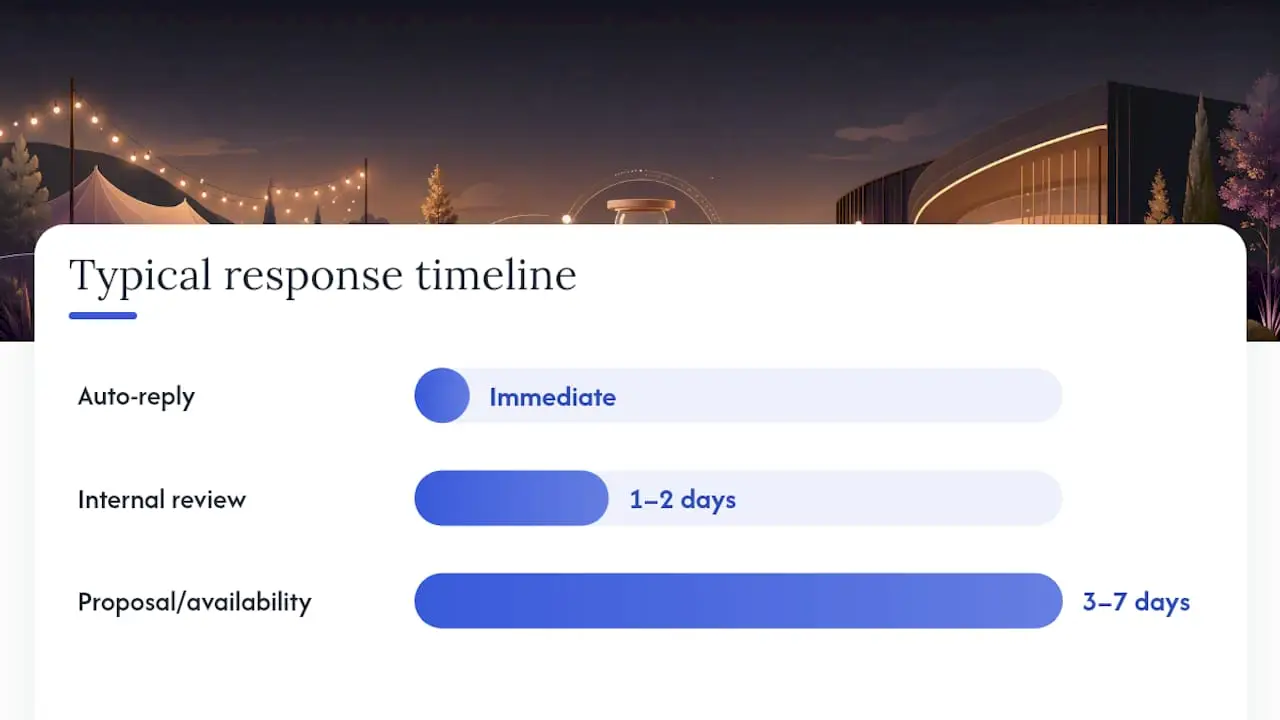
Typical response timeline:
- Immediately: Auto-reply fires, confirms receipt, states your response window and deposit policy
- Within 1–2 business days: Internal review — qualify the lead, check date availability
- Within 3–7 business days: Send a proposal or availability reply; response windows vary by venue size and inquiry volume
Staff next-steps checklist:
- ✅ Review the submission for completeness — follow up if key fields are missing
- ✅ Check date availability; if the date is gone, propose the client’s alternative date or two nearby options
- ✅ Send a personalized proposal with pricing, menu options, and deposit terms
- ✅ Request a signed contract and deposit to hold the date
- ✅ Log the inquiry in your CRM or calendar immediately — lost leads almost always trace back to a submission that never got logged
Routing every submission into a CRM or even a shared Google Sheet prevents the single biggest revenue leak in private-event sales: the inquiry that falls through the cracks. Chapman University’s institutional inquiry form routes submissions directly to the right internal team with policy disclosures built in — the same logic applies to any restaurant or venue that handles more than a handful of inquiries per month.
How Ionhospitality helps restaurants sell more private events
Running a restaurant means you’re already stretched thin. Building and optimizing an event inquiry form, connecting it to your CRM, and then actually marketing your private dining room to the right people — that’s a full project on top of a full-time job.
Ionhospitality handles the whole funnel for restaurants: from building a high-converting website with embedded inquiry forms to running geo-targeted social campaigns that drive private-event leads directly to your booking page. No commissions. No guesswork on ad spend. Just a done-for-you system that puts more private events on your calendar. Pair that with private event promotion strategies built specifically for restaurants, and your inquiry form becomes the start of a real revenue engine. Ready to see what that looks like for your venue? Book a discovery call and we’ll map it out together.
Why your inquiry form is your most underrated sales tool
Most restaurant owners obsess over their menu, their décor, their Instagram grid. The inquiry form? It’s an afterthought — a contact page that asks for a name and email and calls it a day.
That’s a real missed opportunity. A form built with the right fields, conditional logic, and a sharp auto-responder does three things a generic contact form never will: it qualifies the lead before you spend a minute on the phone, it sets expectations so clients don’t ghost you, and it gives your team enough information to send a real proposal on the first reply instead of a back-and-forth that drags on for two weeks.
The venues that convert the most inquiries into bookings aren’t necessarily the most beautiful spaces. They’re the ones with the fastest, clearest response workflow — and that workflow starts the moment someone hits “submit.” A date-flexibility toggle, a deposit acknowledgment checkbox, and a well-written auto-reply are not fancy features. They’re the difference between a lead that books and a lead that moves on to the next venue on their list.
Build the form right once. Then let it work.
Sources
Download or copy templates directly from these vetted sources:
- Browercenter
- Makeform
- Event Inquiry Form Templates
- Event Enquiry Form Template
- Docs
- Claremontmckenna
- Chapman

Add a Comment