
TL;DR:
- Effective Facebook ads for restaurants depend on high-quality creative and proper tracking infrastructure. Broad audiences with engaging content outperform overly narrow targeting, especially as Meta’s algorithm favors creative signals. Consistent budget, patience during the learning phase, and strategic use of Meta’s automated features lead to better results over time.
If you’ve ever boosted a post and wondered where your money went, you’re not alone. Explaining Facebook ads to restaurant owners is something the team at Ionhospitality does every week, because the platform is genuinely more complex than it looks. Officially called Meta Ads Manager advertising, it covers Facebook, Instagram, Stories, and more. Get it right, and you fill seats, drive online orders, and sell out private events. Get it wrong, and you burn through budget with nothing to show. This guide breaks down exactly how the system works, what it costs, and how to measure results that actually matter for your restaurant.
Key takeaways
| Point | Details |
|---|---|
| Creative quality drives delivery | Meta’s algorithm uses your ad content to find the right audience, not just your targeting settings. |
| Pixel alone is not enough | Combine Meta Pixel with Conversions API to avoid missing more than half your conversions. |
| Start with $30 to $50 per day | Spend consistently for 1 to 2 weeks before drawing conclusions or making changes. |
| Advantage+ helps when you’re ready | Automated campaigns work best once you have at least 50 purchase events per week. |
| Patience wins the learning phase | Editing campaigns too soon resets the algorithm and extends unstable performance. |
Explaining Facebook ads: the platform basics
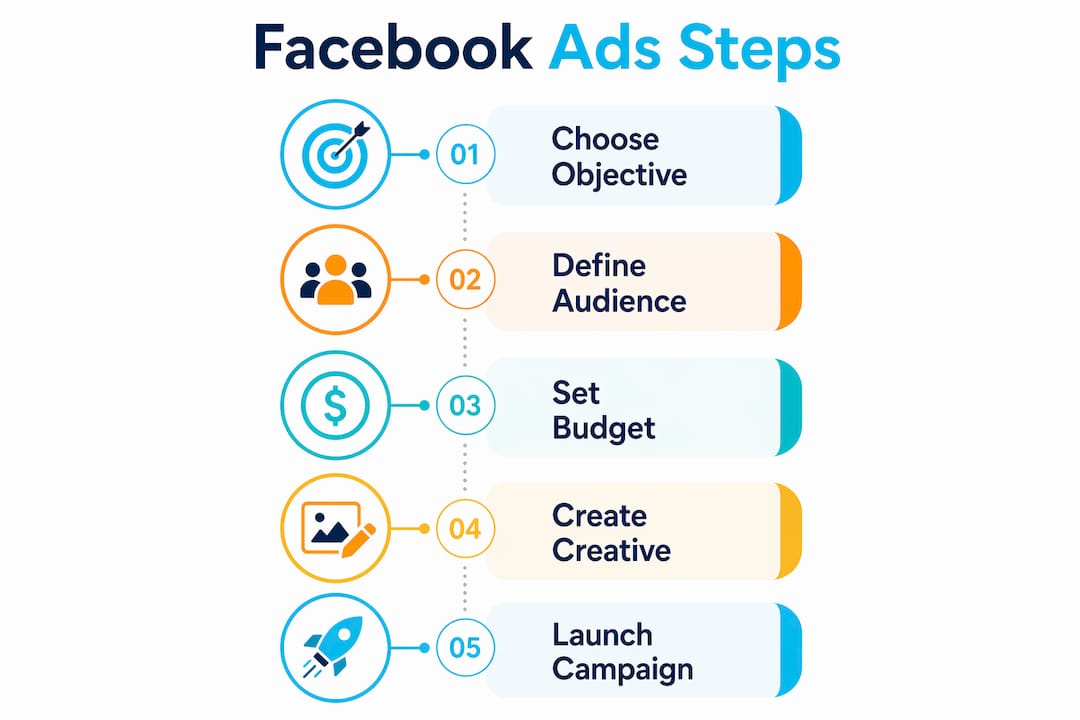
Facebook advertising, run through Meta Ads Manager, is a paid marketing system that places your restaurant’s message in front of people across Facebook, Instagram, Messenger, and the Audience Network. You set an objective, define your audience, choose a format, and set a budget. The platform does the rest.
For restaurants, the most useful ad formats are:
- ** Single image ads** — Great for showcasing a new dish, a happy hour deal, or a seasonal special.
- ** Video ads** — Short clips of your kitchen, your team, or a sizzling plate stop the scroll fast.
- ** Carousel ads** — Let you feature multiple menu items or highlight different event packages in one ad.
- ** Stories ads** — Full-screen, vertical, and highly visible on Instagram and Facebook Stories.
- ** Lead ads** — Collect reservation requests, event inquiries, or email sign-ups directly on the platform without sending people to your website.
When you set up a campaign, you pick an objective first. Your options include Awareness, Traffic, Engagement, Leads, App Promotion, and Sales. For a restaurant trying to fill tables on a Thursday night, Traffic or Leads typically makes the most sense. For a new location launch, Awareness gets you in front of fresh eyes.
You then define your audience by location, age, interests, and behaviors. A pizza shop in Austin might target people aged 21 to 45 within 5 miles who follow food-related pages. This audience definition is where most owners spend too much time, and we will explain shortly why that may be working against you.

How Meta’s ad auction actually works
Every time a user opens Facebook or Instagram, Meta runs an auction in 200 milliseconds to decide which ad they see. The winning formula looks like this:
Total Value = (Bid × Estimated Action Rate) + Consumer Value + User Experience
Your bid is how much you are willing to pay. Estimated Action Rate is Meta’s prediction of whether someone will click. Consumer Value factors in how relevant and engaging your ad is. User Experience accounts for the quality of the page or experience your ad leads to.
Here is the critical insight: your creative quality and your landing page experience are weighted just as heavily as your budget. A restaurant running a stunning 10-second video of a smoked brisket being sliced, leading to a clean online menu, will outbid a competitor spending twice as much with a blurry phone photo and a confusing link.
Since Meta’s Andromeda algorithm update, creative content itself does much of the audience targeting work. Your visuals, your text, and your offer all signal to Meta who should see your ad. This is what marketers now call “your creative is your targeting.”
What does this mean for your restaurant? Spend more time on the ad itself. A scroll-stopping photo of your weekend brunch spread will find brunch lovers better than a carefully built interest audience. Bad creative tanks your estimated action rate, which raises your costs and limits your reach regardless of what you spend.
Pro Tip: Before you increase your budget on a struggling campaign, first swap the creative. A fresh food photo or a short behind-the-scenes video often fixes declining performance faster than any targeting adjustment.
For deeper guidance on how creative quality and onsite experience interact, Ionhospitality’s breakdown of restaurant ad workflows covers this in practical detail.
Tracking results: Pixel, Conversions API, and key metrics
You cannot manage what you cannot measure. This is where many restaurant owners get tripped up, because the default tracking setup is no longer reliable on its own.
Meta Pixel is a piece of code installed on your website that tracks visitor actions like page views, button clicks, and form submissions. The problem is that browser privacy restrictions and iOS updates now mean Pixel-only tracking misses over 50% of conversions. You could be running a profitable campaign and your Ads Manager shows you it is failing.
The fix is the Meta Conversions API (CAPI). CAPI sends conversion data directly from your server to Meta, bypassing browser limitations entirely. When you run Pixel and CAPI together with event deduplication, Meta counts each conversion only once, giving you accurate numbers.
Deduplication works by matching event_name and event_id between your Pixel and CAPI events. If the IDs match, Meta logs one conversion, not two. Without this setup, you will see inflated ROAS numbers that make your campaigns look better than they are, which leads to bad spending decisions.
Once your tracking is solid, here are the key metrics to watch in Ads Manager:
- CTR (Click-Through Rate) — Are people clicking? A strong CTR signals your creative and offer are resonating. Aim for 1% or higher for restaurant campaigns.
- CPC (Cost Per Click) — How much are you paying per website visit? Lower CPC with high-quality traffic is the goal.
- ROAS (Return on Ad Spend) — For every dollar you spend, how much revenue comes back? For restaurants, even tracking online orders or event deposits helps calculate this.
- Conversion Rate — Of the people who click, how many take action? This is where your menu page, reservation system, or order link either closes the deal or loses it.
Segment your Ads Manager metrics by audience, placement, and creative to see what is actually working. Running one broad report tells you very little. Drilling into Instagram Stories versus Facebook Feed performance, for example, often reveals that one placement is driving almost all your results.
Budgeting, campaign setup, and Advantage+
Knowing how to set up and fund your campaigns correctly saves you real money. Here is a practical starting framework:
- Start with $30 to $50 per day for at least 7 to 14 days. Consistent daily spend gives Meta enough data to optimize delivery without constant fluctuations that confuse the algorithm.
- Match your objective to your goal. Trying to get more reservations? Use the Leads objective with a lead form. Driving online orders? Use Sales with your ordering page as the destination. Awareness campaigns build recognition but do not drive direct bookings.
- Consider Advantage+ campaigns carefully. Meta’s automated campaign option uses AI to handle placements, bidding, and audience targeting automatically. These campaigns outperform manual setups when you have at least 50 purchase events per week, at least 5 creative variations, and a sufficient budget. If you are spending $300 per month and running one ad, Advantage+ is not ready to help you yet.
- Rotate your creative every 2 to 4 weeks. Creative fatigue is real. The same food photo running for two months will see click rates drop sharply as your audience stops noticing it. Plan a calendar of fresh visuals tied to your menu changes, seasonal specials, and events.
- Do not edit campaigns during the learning phase. When you launch a new ad set, Meta enters a learning phase where it optimizes delivery. Tinkering too early resets this phase and extends the period of unstable, expensive performance.
Pro Tip: Use budget caps on your retargeting audiences to prevent overspending on people who already know your restaurant. Allocating retargeting budget wisely forces the algorithm to find new customers and improves incremental returns.
Check out Ionhospitality’s guide to restaurant social media ads for a deeper breakdown of campaign structures that work specifically for bookings and events.
Common challenges and how to handle them
Even with a solid setup, restaurant owners run into predictable problems. Here is what to watch for:
- Over-targeting kills reach. Building hyper-specific audiences based on 10 interest categories sounds smart. In 2026, it often backfires. Broader audiences with great creative outperform narrow ones because Meta’s algorithm has more room to find the right people.
- Your landing page is part of the ad. If someone clicks on a beautiful photo of your Wagyu burger and lands on a homepage with no clear path to order or reserve, you lose them. Your menu page, reservation link, or online order system needs to be fast, clean, and mobile-friendly.
- Use exclusions and retargeting wisely. Exclude your existing customer list from cold traffic campaigns to avoid wasting budget on people already loyal to you. Run a separate retargeting campaign for website visitors or people who engaged with your posts.
- Do not read too much into week-one data. The learning phase produces volatile results. A campaign that looks expensive on day three might find its rhythm by day ten. Give it at least 7 days and 50 total conversion events before making major decisions.
- Refresh content before it flatlines. Track frequency scores in Ads Manager. When the average user has seen your ad 3 or more times, performance typically drops. That is your cue to swap creative, not increase budget.
Understanding these patterns separates restaurant owners who get results from those who give up on Facebook ads after one frustrating month. For a full breakdown of the metrics that matter most, Ionhospitality’s resource on restaurant marketing KPIs is worth bookmarking.
My take on what actually moves the needle
I’ve worked with enough restaurant owners to know the pattern. They spend two weeks building the perfect audience, obsessing over targeting parameters, and then launch with a single, mediocre photo of their dining room. The campaign underperforms. They blame Facebook.
In my experience, the restaurants that win with Meta ads are the ones who flip that priority. They spend 80% of their prep time on the creative and the offer. A slow-motion pour of a craft cocktail. A 15-second reel of a private event setup coming together. A lead form that promises a tasting discount in exchange for an email. The targeting almost handles itself from there.
What I’ve learned is that your tracking infrastructure is not optional anymore. Without Pixel and CAPI working together correctly, you are flying blind. You will make decisions based on numbers that are wrong, and you will either kill campaigns that are working or keep running ones that are not.
The other thing I caution people against is impatience. I’ve seen owners pull campaigns after four days because they “weren’t working.” That is not enough time for Meta to exit the learning phase. The discipline to let data accumulate before making changes is one of the most underrated skills in digital advertising.
Facebook ads for restaurants are not magic. They are a system. Learn the system, invest in your creative, get your tracking right, and give campaigns time to breathe. The results follow.
— Doug
Ready to put this into practice?
Running effective Facebook ad campaigns takes more than reading a guide. It takes real setup, consistent creative production, and ongoing optimization. That is exactly what Ionhospitality does for restaurants across the U.S.
At Ionhospitality, the team specializes in social media advertising for restaurants, from campaign builds and pixel setup to creative strategy and retargeting. If you want someone to handle all of this for you, with zero commissions and a focus on filling seats and booking events, the next step is simple. Download the free retargeting playbook to start, or book a discovery call to talk through what your restaurant specifically needs.
FAQ
What are Facebook ads for restaurants?
Facebook ads are paid promotions placed through Meta Ads Manager that appear on Facebook, Instagram, Messenger, and the Audience Network. Restaurants use them to drive reservations, online orders, event bookings, and local awareness.
How much should a restaurant spend on Facebook ads?
Starting at $30 to $50 per day for 7 to 14 days gives Meta enough data to optimize delivery. Consistent daily spend outperforms sporadic bursts when it comes to building reliable results.
Why is my Facebook ad not converting?
Poor creative, a slow or confusing landing page, or inadequate tracking are the most common culprits. Make sure your Pixel and Conversions API are both active, your offer is clear, and your menu or reservation page works perfectly on mobile.
What is Meta Pixel and do I need it?
Meta Pixel is tracking code installed on your website that records visitor actions. You need it, but it is not enough on its own. Pair it with the Conversions API to capture the conversions that browser privacy restrictions would otherwise hide.
How long before Facebook ads show results for my restaurant?
Give any new campaign at least 7 to 14 days before drawing conclusions. Meta’s learning phase requires time and ideally 50 conversion events to stabilize delivery and costs.

Add a Comment