
TL;DR:
- Many restaurant digital ad failures stem from broken workflows rather than platform issues, emphasizing the importance of a complete, well-optimized chain from creative to confirmation. Proper tracking, compelling visuals, tailored landing pages, and rapid response to inquiries significantly improve conversion rates and private booking success. Focusing on workflow quality and continuous optimization transforms ad spend into actual reservations and revenue.
You’re spending money on digital ads, watching the clicks roll in, and still staring at empty tables or a catering inquiry inbox that’s dead quiet. Sound familiar? The problem usually isn’t your budget or the platform. It’s your restaurant digital ads workflow — the chain of steps between someone seeing your ad and actually booking a table or a private event. When one link in that chain breaks, the whole thing fails. This guide walks you through exactly how to fix it, from creative to conversion tracking to handling private event leads before they go cold.
Table of Contents
- Understanding the restaurant digital ads workflow
- Preparing your creative and landing pages for success
- Implementing conversion tracking and optimizing ad performance
- Managing private event inquiries with speed and precision
- Rethinking your restaurant’s digital ad workflow: Insights from 2026
- How ION Hospitality can elevate your restaurant’s digital ad workflow
- Frequently asked questions
Understanding the restaurant digital ads workflow
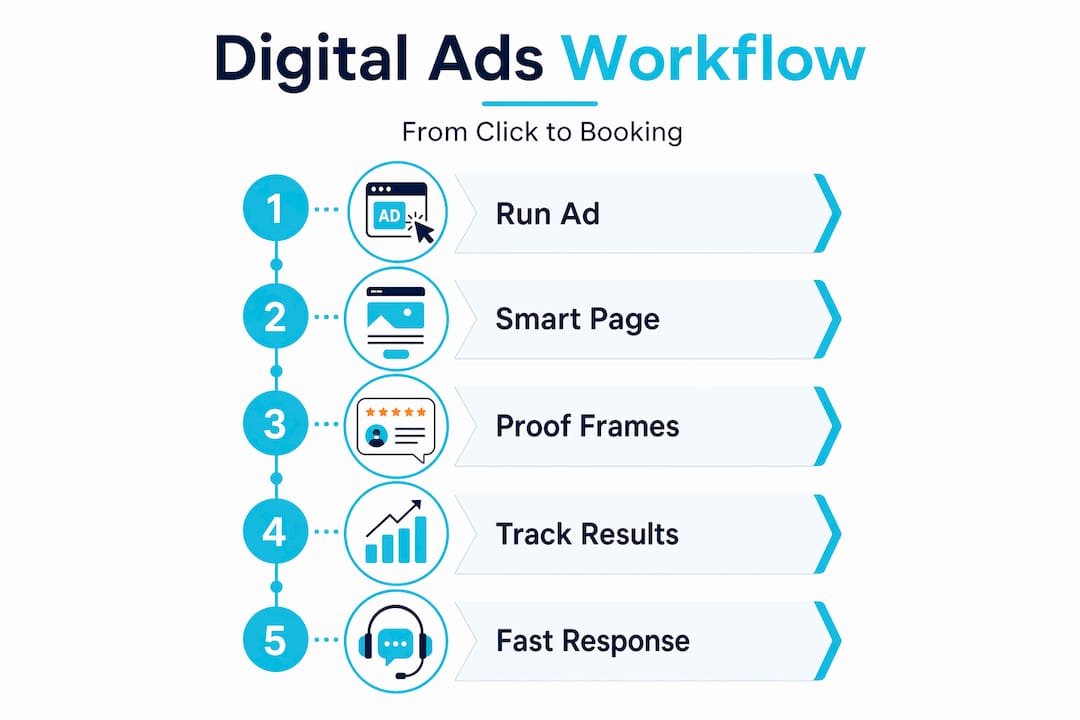
Think of your ad workflow as a relay race. 🏁 Each leg matters. Drop the baton anywhere and the race is lost, regardless of how fast you ran the first leg. Here’s what the full workflow looks like end to end:
- 🎨 Ad creative — the scroll-stopping image or video that earns the click
- 🖥️ Landing page — a page built around one specific intent (book a table, inquire about a private event, order online)
- 🎯 Offer and CTA — a clear, compelling reason to act right now
- 📋 Reservation or inquiry capture — the form, phone call, or booking widget
- ✅ Confirmation — what happens immediately after someone submits
- 📊 Tracking and optimization — measuring what worked and improving it
Most restaurant owners focus on step one and step two, then wonder why results are flat. According to the Restaurant Ads Creative Playbook, most failures come from breaking the chain of ad → landing page → offer → reservation capture → confirmation → measurement, not from the ad platforms themselves. That’s a critical distinction.
Generic landing pages are one of the biggest killers. If your Facebook ad promotes a weekend brunch special but the link drops people on your homepage, you’ve already lost most of them. The same goes for unclear offers and mismatched imagery. Your ad shows a sizzling steak, but the landing page features cocktails? Confusing. Conversion drops immediately.
Proof frames are another underused tool. These are visual or text elements that show the portion size, packaging quality, or outcome (a full table of happy guests at your private dining room). They reduce hesitation before the click by answering the unspoken question: “Is this worth my time?” Use them in both the ad and the landing page for maximum effect.
Understanding overcoming digital marketing challenges is the first step toward building a workflow that actually converts. Once you understand the full chain, you can find your weak links fast.
Now that you understand the workflow basics, let’s prepare your digital ads by focusing on creative and landing pages.
Preparing your creative and landing pages for success
Here’s the uncomfortable truth: ads fail more often due to unclear photos, unclear value, or inconsistent proof than technical platform issues. Before you touch your targeting settings, get your creative and landing pages right.
For your ad creative, follow these principles:
- 📸 Show the dish front and center with realistic colors. No heavy filters.
- Keep backgrounds clean. Clutter in the background kills focus.
- Use minimal text overlays. Let the food do the talking.
- Match the visual exactly to what guests will receive. No bait-and-switch.
- For private events, show the room — set tables, ambient lighting, a group actually enjoying the space.
For your landing pages, the rule is one page, one intent. Don’t ask someone to book a table and sign up for your email list and order online all at once. Pick one action per campaign.
Every landing page should answer four questions immediately:
- What is being offered? (Weekend brunch, private dining package, holiday party)
- Who is it for? (Families, corporate groups, date night couples)
- When is it available?
- What should they do next? (One clear CTA button, above the fold)
Proof frames belong on the landing page too. Show a plated dish next to a size reference. Show a photo of your private dining room filled with a corporate group. These visuals do more for conversion than any headline you’ll write.
Visual storytelling tips can help you build the visual narrative that matches your brand promise. And if you want to see how strong creatives translate into actual reservations, check out how social media ads drive bookings for restaurants that get this right.
Mobile is non-negotiable. Over 70% of restaurant searches happen on phones. If your landing page loads slowly, has tiny tap targets, or buries the CTA below the fold, you’re handing potential guests to the restaurant down the block. Test your pages on your own phone before you spend a single dollar on ads.
Pro Tip: Use a short scanning-friendly version of your menu or event package on the landing page. Three to five bullet points covering what’s included, price range, and availability moves people to action faster than paragraphs of description.
You can also explore how to launch restaurant campaigns that convert from day one for additional campaign structure guidance.
With your creatives and landing pages ready, next we’ll set up tracking and measuring to optimize ad outcomes.
Implementing conversion tracking and optimizing ad performance
Running ads without proper tracking is like cooking without tasting. You might get lucky, but you won’t know why.
Here’s how to set up conversion tracking that actually measures what matters:
- Connect your reservation platform — OpenTable links ads directly to booking widgets so reservations appear in ad reporting, enabling ROI measurement. This means you see exactly which campaign or ad led to a confirmed table.
- Configure Google Ads conversion actions — Google Ads treats phone calls and direction or map clicks as high-intent actions and requires explicit conversion setup to track them.
- Use dynamic number insertion — This assigns unique phone numbers to different ad campaigns so you know which ad triggered which call. Essential for private event inquiry tracking.
- Set up event inquiry form tracking — Tag your event inquiry submission confirmation page as a conversion so every form fill is counted and attributed.
- Track reservation confirmations, not just clicks — A click means interest. A confirmed booking means revenue. Only the latter tells you if your campaign is working.
| Conversion action | Tracking method | Setup requirement |
|---|---|---|
| Table reservation | OpenTable + Google Tag | Booking widget integration |
| Phone call (over 60 sec) | Dynamic number insertion | Call tracking platform |
| Event inquiry form | Google conversion tag | Thank-you page URL trigger |
| Direction or map click | Google Ads auto-tagging | Enable in campaign settings |
| Online order completion | Pixel or Google tag | Confirmation page tag |
This table covers the core actions worth tracking in any restaurant ad campaign management setup. Start with the top three if you’re building your tracking from scratch.
One mistake we see constantly: restaurant owners measure lead volume instead of confirmed bookings. A hundred event inquiry form fills is noise if only two convert. Track downstream all the way to signed contracts or confirmed reservations for meaningful data.
Pro Tip: Submit a test inquiry or reservation yourself once a week during live service hours. Check if your tags fire, if confirmation emails send, and if the lead appears in your reporting. Broken tracking is silent. You won’t know it’s broken until you look.
For more on building the full digital advertising guide for your restaurant, and to understand how tracking connects to your increase bookings guide, those resources go deeper on campaign structure and attribution.
Tracking your ad results thoroughly enables the next step: handling leads efficiently to maximize private event bookings.
Managing private event inquiries with speed and precision
Here’s a stat that should stop you mid-scroll: responding within 5 minutes makes you 21 times more likely to qualify a private dining lead. Twenty-one times. Most restaurants respond in hours. Some never respond at all.
The core problem is timing. Private event inquiries come in during lunch rush, Friday dinner service, or at 11pm. No one’s at a desk. The inquiry sits. The lead cools. By morning, they’ve booked somewhere else.
Every first response to a private dining inquiry should include these 7 elements:
- ✅ Acknowledgment that you received their inquiry (immediate, even if automated)
- 📅 Available dates for their requested timeframe
- 👥 Capacity options for their group size
- 🍽️ A brief menu or package overview
- 💰 A starting price or price range
- 📞 A direct contact name and number
- 🔗 A link to your event inquiry page or a booking calendar
Automation options worth considering:
- AI sales assistants can send detailed, personalized first responses within 60 seconds of form submission, 24 hours a day.
- For smaller events (under 20 guests), automating the entire first reply often outperforms a delayed personal follow-up.
- For larger buyouts or corporate events, automate the acknowledgment but flag for a personal follow-up within 30 minutes.
Set up a dedicated phone line for private dining. Keep it separate from your general reservations number. This does two things: it signals to the caller that you take events seriously, and it makes tracking event inquiry calls in your private bookings strategies much cleaner.
Pro Tip: Test your own response system. Submit an event inquiry through your website on a Saturday at 7pm. Time the response. Read it. Would it convince you to book? If not, fix it before you spend another dollar on ads pointing to that broken process.
For a deeper look at event marketing strategies that fill your private dining calendar consistently, that resource is worth your time.
Rethinking your restaurant’s digital ad workflow: Insights from 2026
Most restaurant owners we talk to believe poor ad performance comes from bad targeting or a budget that’s too small. That belief is costing them money.
Restaurants often blame ad platforms for poor results, but failures typically stem from weak creative and broken workflow chains, not the platforms themselves. We’ve seen restaurants cut their cost per booking in half simply by fixing their landing pages, without touching their targeting at all.
“Ads don’t create clarity. Ads amplify what you already have. When your visuals are clean and consistent, ads get easier and cheaper to run.”
That framing changes everything. Your ad budget isn’t a lever you pull to buy results. It’s a multiplier on the quality of your underlying workflow.
Here’s another thing we’ve learned: measuring success by lead volume is a trap. A campaign that generates 50 event inquiries but books 2 is underperforming. A campaign that generates 12 inquiries and books 9 is a machine. Optimize for confirmed bookings and signed contracts, not form fills.
Automating the first response to event inquiries often outperforms a delayed personal reply, and it scales without hiring. A well-written automated reply sent in 60 seconds converts better than a thoughtful personal one sent 4 hours later. Both the research and our own client results confirm this.
Finally, plan for creative fatigue. An ad that crushes it in month one will tire by month three. Build a monthly refresh cycle into your workflow. Swap in new photos, test new offers, update the seasonal angle. Small changes compound into sustained performance over time. This is the part of the restaurant advertising guide most agencies skip because it requires ongoing work, not just a launch.
How ION Hospitality can elevate your restaurant’s digital ad workflow
Ready to stop guessing and start booking? ION Hospitality builds end-to-end digital ad workflows designed specifically for restaurant owners who want more covers, more online orders, and a private events calendar that’s consistently full.
We handle everything from scroll-stopping creative development to landing page design, conversion tracking setup, and private event lead automation — all with 0% commissions on your bookings. Our team specializes in social media advertising services that move the needle on actual revenue, not vanity metrics.
Here’s what we bring to your restaurant’s ad workflow:
- 🎨 Creative development — photos, reels, and copy built to convert
- 🖥️ Landing page design — intent-matched pages for reservations, events, and delivery
- 📊 Ad tracking setup — full conversion tracking from click to confirmed booking
- 🤖 Private event lead automation — rapid-response systems that qualify leads 24/7
- 🔄 Campaign optimization — monthly creative refreshes and data-driven adjustments
Explore our event marketing strategies or dive into our restaurant marketing guide to see the full picture. When you’re ready to talk, book a discovery call and we’ll map out a workflow built around your restaurant’s goals.
Frequently asked questions
What is a restaurant digital ads workflow and why does it matter?
It’s the complete process from running ads to converting clicks into reservations or event bookings, ensuring efficient use of your ad budget to fill tables and grow revenue. According to the Restaurant Ads Creative Playbook, running this as an end-to-end chain is what separates campaigns that convert from ones that just generate clicks.
How can I track if my digital ads actually lead to more reservations?
Integrate your ads with a reservation platform like OpenTable and configure Google Ads conversion tracking to link clicks to confirmed bookings for accurate ROI measurement. OpenTable links ads directly to their booking widgets so reservations show in ad reporting, giving you a clear picture of what’s working.
What is the fastest way to respond to private event inquiries to avoid losing leads?
Respond within 5 minutes using automated AI assistants or a dedicated event coordinator, with detailed and specific information about availability, capacity, and pricing. Responding within 5 minutes makes you 21 times more likely to qualify a private dining lead.
Why is creative quality so important in restaurant digital ads?
Clear, realistic photos that match what customers will receive build trust and reduce hesitation, making ads more effective at generating bookings and orders. Ads fail more often due to unclear photos or inconsistent proof than due to platform problems.
How can I improve mobile user experience on my ad landing pages?
Design pages with mobile-first principles: fast loading, clear action buttons above the fold, thumb-friendly tap targets, and minimal form fields. Mobile usability directly influences task completion and conversion behavior, so mobile-first design helps users complete bookings faster and with less friction.

Add a Comment